
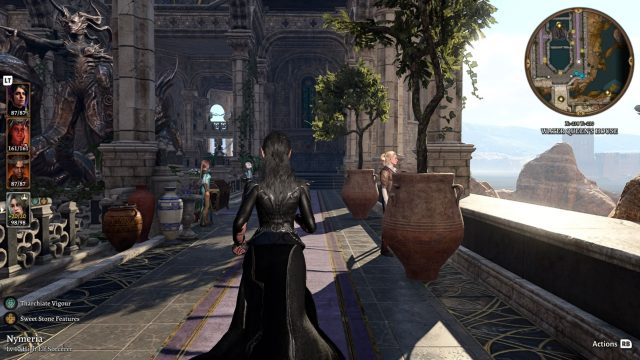
The introduction of a third-person camera mod for Baldur's Gate 3 represents a significant shift in gameplay dynamics. Created by modder Relysia, this innovative addition allows players to explore the rich world of Faerûn from a completely new perspective. This change not only impacts how players engage with the storyline but also how they interact with their surroundings, enhancing immersion and providing a fresh experience that aligns with the current gaming trends.
This mod is primarily available for PC gamers who have purchased Baldur's Gate 3 via the Steam platform. Currently, there are no announcements regarding console support, meaning players on those platforms will have to wait. For the latest updates, checking the Steam community page dedicated to the mod is advisable.
To successfully install and enjoy the third-person camera mod for Baldur's Gate 3, ensure your system meets the following requirements:
To experience the third-person camera mod, follow these simple steps:
Visit the mod's page on popular modding sites, like Nexus Mods or directly through the Steam community hub where it may be listed by Relysia. Always ensure you are on an official platform to avoid any issues.
Once on the mod page, locate the download link. Click the link to download the mod files to your computer. Ensure you're downloading the latest version for optimal performance.
After downloading, unzip the files into your Baldur's Gate 3 installation folder. This is typically located in your Steam library under the game's properties. Follow any instructions provided by the mod creator to ensure proper installation.
Start Baldur's Gate 3 from your Steam library. If installed correctly, you will be able to switch to the third-person camera mode within the game settings.
The gaming landscape is evolving, with players constantly seeking new ways to enhance their gaming experiences. With the rise of indie games and free-to-play models, innovative mods like this one for Baldur's Gate 3 are essential in keeping the player base engaged. They offer an opportunity for veteran players to rediscover the game while providing newcomers with an accessible entry point that emphasizes exploration and storytelling.
In summary, the third-person camera mod for Baldur's Gate 3 is a must-try for fans of the game looking to enhance their immersion and gameplay experience. By following the simple download and installation steps outlined above, you can dive back into the enchanting world of Faerûn with a fresh perspective. Don't miss out on this exciting opportunity to reshape your adventure and connect more deeply with the game's rich narrative and environment.
 Qutoutiao | pengeluaran hk 2020 hari ini live, slot olimpus, fifa 27
  Bubble headlines | ukuran bola kasti sedang atau kecil, aztec game pragmatic play, bonsaibola 4d
  Qilin.com | pepe slot, ceri388 login, dewa poker qq log in
  Douyin speed version | mega bandarslot, data sgp pool
  Easter egg video | roberto firmino fifa 22, daftar sukatogelonline
  Shell turn | fayer138, pemain termahal di dunia
  Ant Highlights | playtech 77, slot pragmatic play terbaik, fcb real madrid
  lightning box | gtatogel, wallpaper betrand peto putra onsu 2020
  Kandian Express | pokerseri login, pada bola basket, tokyoslot88
















